

Route modification and reoptimisation
Add or remove operations on a route that is already scheduled, move or swap routes between vehicles, or reoptimise an existing plan. API Optim recalculates the times and flags any constraints that are no longer met.
What the API handles
Change the plan without starting from scratch.
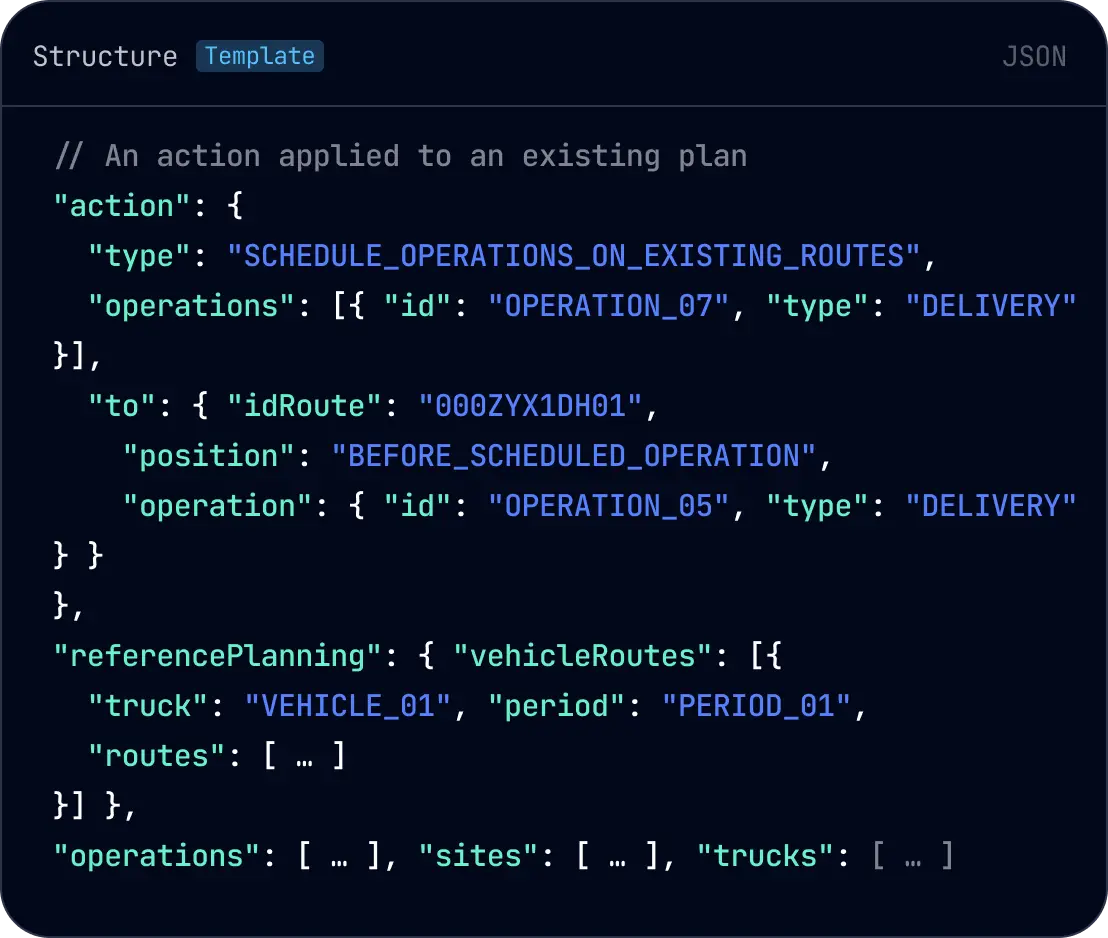
Each change is an action sent with the routes concerned. Your software describes the current plan, states the action to perform and receives the recalculated routes. The extract opposite shows what an action looks like; each card below links to its page in the technical documentation.
01 Operations on a route

Add an operation at a given position
Insert an operation where the planner chooses, for example just before a delivery that is already planned. The rest of the route is recalculated.
SCHEDULE_OPERATIONS_ON_EXISTING_ROUTES position

Add operations at the best position
Add one or more operations to an existing route: the API chooses where they go on the route.
SCHEDULE_OPERATIONS_ON_EXISTING_ROUTES operations

Remove operations
Unschedule some of the operations on a route. The remaining operations are kept and their times recalculated.
UNSCHEDULE_OPERATIONS_FROM_EXISTING_ROUTES
02 Recalculating a route

Reoptimise a route
Submit an existing route to recalculate its order. It can be described simply, by the ordered list of its operations, or by the result of a previous calculation.
OPTIMIZE_EXISTING_ROUTES referencePlanning

Evaluate a route
Check that a route is still feasible after a change in constraints, such as a change to the vehicle’s availability. The order of operations stays the same; the times may change.
EVALUATE_EXISTING_ROUTES

Reverse a route
Reverse the order of operations on a route that is already scheduled.
REVERSE_ROUTES

Impose a time
Set the departure time of an existing route, or a time window for one of its operations, then evaluate the route: the times are recalculated taking this constraint into account.
additionnalTemporalConstraints
03 Routes and vehicles

Move a route to another vehicle
Transfer a route to another vehicle’s availability period.
MOVE_EXISTING_ROUTES

Swap two routes
Swap two routes scheduled on two different vehicles.
SWAP_EXISTING_ROUTES

Swap the activity of two vehicles
Swap all the routes in one availability period with those of another vehicle.
SWAP_TRUCK_PERIODS

Merge routes
Combine several routes into one, even if they come from different vehicles or periods.
MERGE_EXISTING_ROUTES

Chain routes
Put several routes end to end in the order given. Operations keep their order, even if the result is not optimised.
CONCATENATE_EXISTING_ROUTES

Delete routes
Unschedule a list of routes. The vehicle’s other routes in the period are kept.
UNSCHEDULE_EXISTING_ROUTES
04 Global reoptimisation

Complete an existing plan
Run a global optimisation that takes routes already scheduled into account and adds the operations still to be scheduled.
COMPUTE_ROUTES

Protect existing routes
Give each route a status: free by default, open, with a list of removable operations, or closed: its operations stay on the same vehicle and none are added.
status FREE OPEN CLOSED removableOperations
Annotated example
A delivery added at the chosen position.
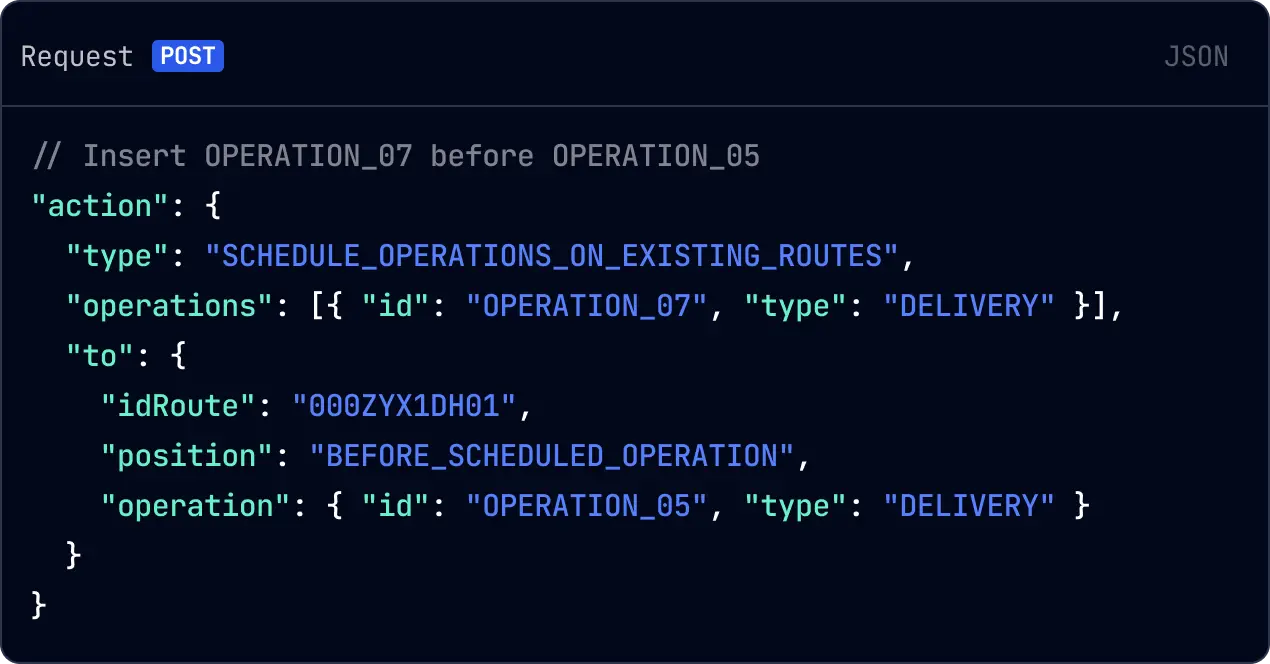
The existing route has five deliveries from the same depot. It is sent as is with the new operation and its site.
The action specifies the target route and the position: before delivery OPERATION_05.
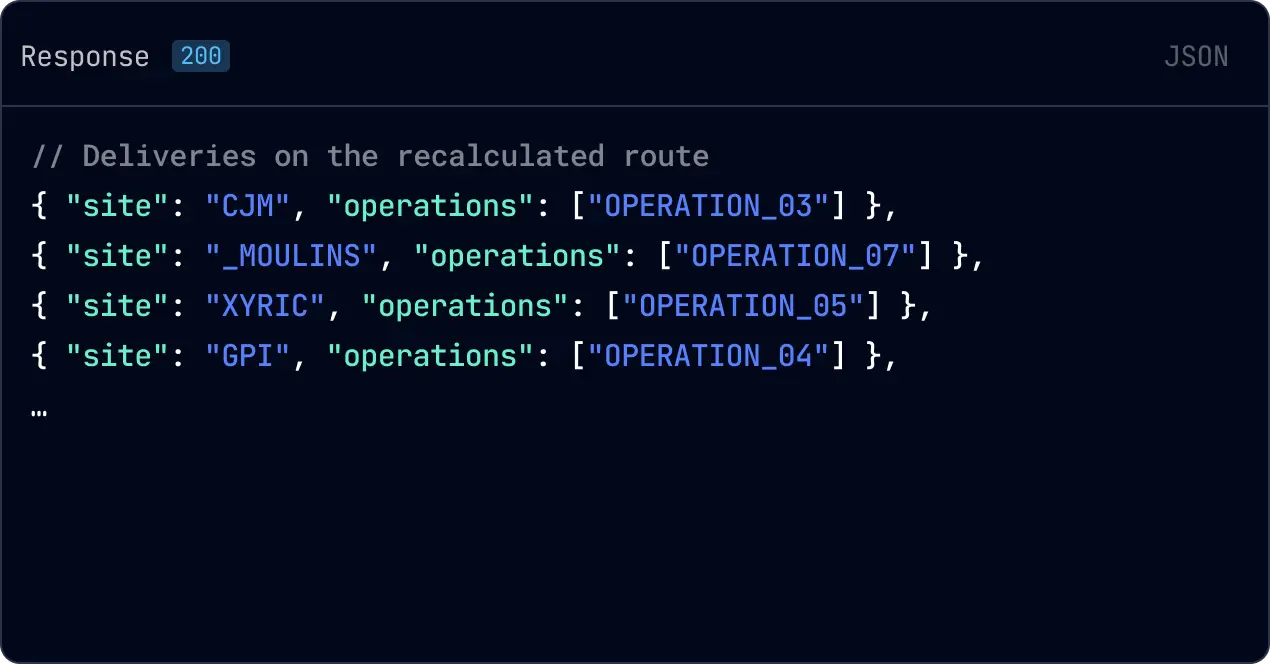
The API inserts the Moulins delivery between CJM and XYRIC, and recalculates the journeys and times for the whole route.
What the API returns
A recalculated route, with its alerts.
After each action, the solution returns the routes concerned, recalculated. If a route no longer meets all the constraints, it comes with the list of constraints not met: your software can display it to the planner.
| Field | Content |
|---|---|
vehicleRoutes | The recalculated routes, grouped by vehicle and by availability period. |
routes | Each route with its identifier, which your software reuses for subsequent actions. |
activities | The route’s new sequence of activities, in visiting order. |
timeWindow | The recalculated times of each activity, from departure to return. |
violationConstraints | The list of constraints the route no longer meets, for example a route ending after the vehicle’s availability ends. |
code · messageViolation | For each constraint, a code and a readable message, for example DEP0042 “End of time window exceeded”. |
Good to know
A few rules to know before integrating.
| Rule | What you need to know | Parameters involved |
|---|---|---|
| An evaluation does not change the order | Evaluation keeps the order of operations. It can change the times and add or remove alerts on constraints not met. | EVALUATE_EXISTING_ROUTES |
| A route to be reoptimised covers a single vehicle | By design, the route submitted is linked to a single vehicle and a single availability period. | OPTIMIZE_EXISTING_ROUTES |
| Send all the activity for the period | To move or swap a route, also send the vehicle’s other routes for the same period, for each vehicle involved. | referencePlanning MOVE_EXISTING_ROUTES SWAP_EXISTING_ROUTES |
| Chaining keeps the order given | Routes are put end to end in the order given, without optimising the whole. | CONCATENATE_EXISTING_ROUTES |
| A closed route can still be reordered | The open and closed statuses fix the operations on the vehicle, but the order and times can change if the solution improves. To keep a route identical, combine the status with fixed times. | status CLOSED additionnalTemporalConstraints |
| The dock limit requires the full plan | The constraint on the number of docks is not intended for actions that only cover part of the routes. | dockConstraints |
FAQ
Your questions about reoptimisation.
Do I need to send the full details of a route to reoptimise it?
No. The ordered list of operation identifiers, linked to the route identifier, is enough. You can also send back the full result of a previous calculation.
Can a last-minute order be added without recalculating the whole plan?
Yes. The operation is added to an existing route, at the chosen position or the best position. The action only affects the target route.
What happens if the modified route no longer meets the constraints?
The route is still returned, with the list of constraints not met: a code and a message for each.
Can certain routes be kept intact during a global reoptimisation?
Yes. The operations of a closed route stay scheduled on the same vehicle, and no new operations are added to it. To keep the order and times as well, combine this status with fixed times.
Can the departure time of an existing route be imposed?
Yes. The departure time or the time of an operation is set on the existing route, and evaluating the route recalculates the times taking this constraint into account. Full details are on the Schedules, service times and regulations page.
Take the next step
Test route changes on your customers’ routes.
Our experts help you translate your customers’ planning adjustments into API actions.

