

Assignments, priorities and unscheduled operations
Impose a vehicle or depot on an operation, give priorities to orders and vehicles, and limit the activity of each lorry. When not everything can be scheduled, API Optim lists the rejected operations and their probable causes.
What the API handles
Your customers’ planning rules.
Imposed assignments and priorities are declared on operations, a site’s position in its logistics profile, and activity limits on vehicle types and their availability periods. The extract opposite shows where each parameter goes; each card below links to its page in the technical documentation.

01 Imposed assignments

Operation reserved for a vehicle
Impose the vehicle, and its availability period if needed, when you know in advance who must carry out the operation. It is scheduled on that vehicle or rejected.
truckAssignment idTruck idAvailablePeriod

Operation attached to a depot
Specify the depot where a collection is unloaded, or the one where a delivery is loaded. The solution respects this link.
idSiteOrigin idSiteDestination

Grouped operations
Give the same group identifier to operations at different sites to favour scheduling them on the same route.
idGroup

Site position on the route
Put a site first on the route, or give it a route of its own. The other sites are placed as best they can be.
positionOnRoute FIRST SITE_ALONE
02 Priorities

Operation priority
When the fleet is not enough to schedule everything, give each operation a priority level. Which way the scale reads is set in the profile, and a dedicated optimisation criterion, defined with our experts, takes it fully into account.
priority operationsPriorities

Vehicle usage priority
When there are more vehicles than needed, favour certain availability periods. The lower the value, the higher the period’s priority, with the appropriate optimisation criteria.
usePriority

Optimisation criteria
Choose what the calculation aims to improve, in order: rejected operations, distance… These criteria are set with our experts.
valorizations
03 Activity limits

Number of sites per route
Limit the number of collection or delivery sites on a route, per vehicle type. Depots, yards and uncoupling sites are not counted.
maxSitesPerRoute

Number of routes per period
Limit the number of routes a vehicle can run within an availability period.
maxRoutes

Operation split across several routes
Allow the API to split an operation that is too large for one vehicle and schedule its parts across several routes.
splittable idxSplit
04 Unscheduled operations

List of unscheduled operations
Operations the API could not schedule are listed in the solution. Your software can show them to the planner.
rejectOperations

Probable causes
For each unscheduled operation, the API can give probable causes, with a code and a message: end of time window exceeded, operation too far from the route…
rejectionCauses constraintViolation
Annotated example
An unscheduled order, with its probable causes.
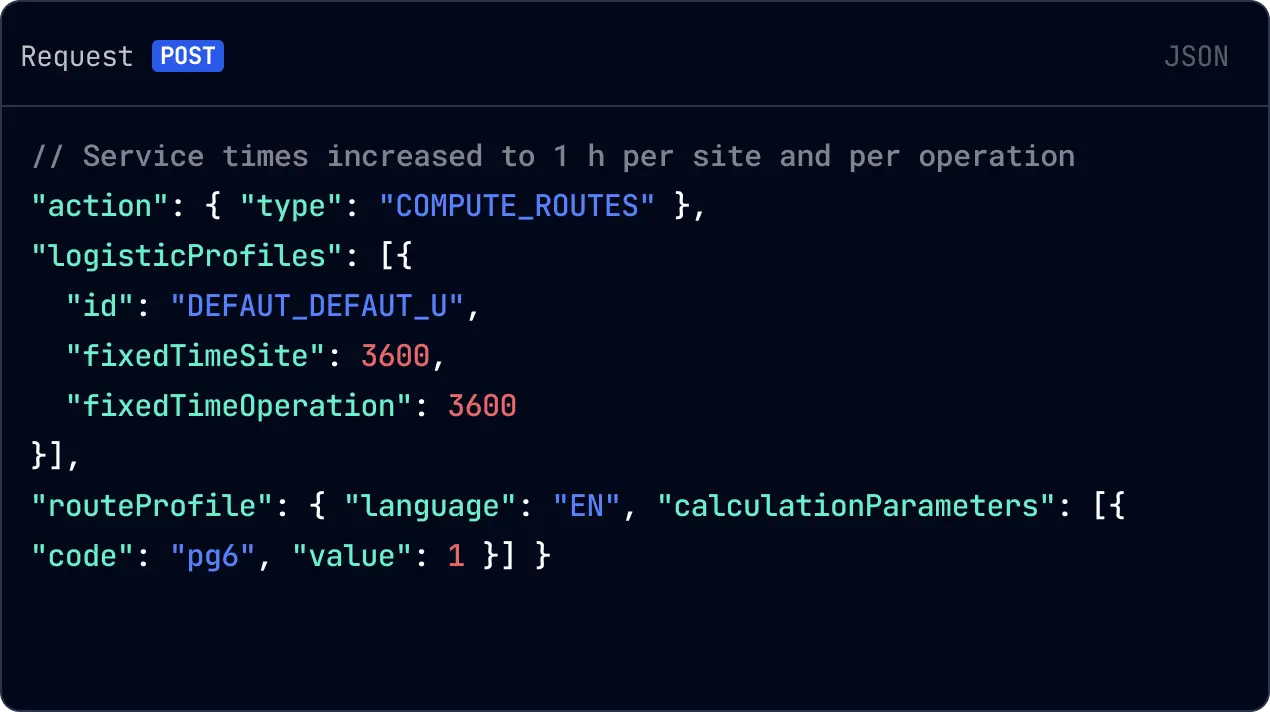

Service times are increased to one hour per site and per operation. Given the vehicles’ availability, not all operations fit any more.
The API schedules what it can and lists operation OPERATION_02 among the unscheduled operations.
It gives two probable causes: the end of the time window would be exceeded, and the operation is too far from the route to be inserted.
What the API returns
What is scheduled, and what is not.
As well as the routes, the solution lists the rejected operations and, where relevant, how some were split. Your software knows what is left to handle and can display it to the planner.
| Field | Content |
|---|---|
rejectOperations | The list of operations the API could not schedule. |
rejectionCauses | For each unscheduled operation, an unordered list of probable causes, during a global calculation. |
code · messageViolation | For each cause, a code and a message, in the language chosen in the profile (French by default). |
idxSplit | For a split operation, the index of each of its parts, which keep the identifier of the original operation. |
modifiedData | The changes made to operations during the calculation, including splitting, with the quantity of each part. |
Good to know
A few rules to know before integrating.
| Rule | What you need to know | Parameters involved |
|---|---|---|
| Probable causes are only available for global calculation | They are available during a global optimisation, once enabled in the calculation profile, and not for actions on existing routes. | COMPUTE_ROUTES rejectionCauses |
| Causes are probable and unordered | The list helps you understand why an operation could not be fitted in. It is not ranked by importance. | constraintViolation |
| An imposed assignment can cause the operation to be rejected | An operation reserved for a vehicle is scheduled on that vehicle, or rejected if inserting it breaks constraints. | truckAssignment |
| Operations are not split by default | Splitting across several routes must be allowed operation by operation. | splittable |
| Grouping favours, it does not impose | A group identifier steers operations towards the same route. | idGroup |
| Optimisation criteria require expertise | How they are set determines the quality of the results. Our experts tell you which criteria to use, and in what order. | valorizations |
FAQ
Your questions about assignments and priorities.
What happens when the fleet is not enough to schedule everything?
The API schedules what it can and lists the rejected operations. With priorities on operations and the appropriate optimisation criterion, the most important ones are scheduled first.
Can I find out why an operation was not scheduled?
Yes, during a global optimisation. For each rejected operation, the API gives probable causes, with a code and a message your software can display.
Can a vehicle be imposed for an order?
Yes. The operation is attached to a vehicle, and to one of its availability periods if needed. It is scheduled on that vehicle, or rejected if that is impossible.
Can certain vehicles be used first?
Yes. Each availability period can be given a usage priority, for example to call on the in-house fleet first.
Can I choose what the optimisation aims to reduce?
Yes, with ordered criteria: number of rejected operations, distance… They are set with our experts.
Take the next step
Test priorities on your customers’ routes.
Our experts help you translate your customers’ assignment rules and priorities into API parameters.

