

Compartmentalised vehicles
Describe every compartment of your customers’ vehicles: capacity, access mode, unit and filling rules. API Optim assigns each operation to a compatible compartment and builds the route in the same calculation.
What the API handles
Eight rules to describe every vehicle.
All of them are declared in the same problem and can be combined. The structure opposite shows where each parameter goes; each card below links to its page in the technical documentation.


Capacity of each compartment
Describe each compartment with its capacity, either fixed or variable between a minimum and a maximum. A total capacity can also cap all the compartments together, for example when movable bulkheads share the same trailer.
maximalSize minimalSize maxCapacity

Compartment access mode
Independent compartments, filled and emptied separately, as on a milk or heating oil tanker. Or rear access: at each stop on the route, only the area behind the last bulkhead can be reached.
COMPARTMENTS_ALL_ALWAYS_ACCESSIBLE FROM_THE_REAR_OF_THE_VEHICLE

Calculation unit
Choose the unit in which compartments are managed: volume (the default), weight, or an additional quantity specific to your business. Each operation states its quantity in this unit.
unitOfCompartments VOLUME WEIGHT FIRST_ADDITIONAL_QUANTITY

Filling rules
For each compartment, specify whether it takes a single operation, several operations of the same product or several operations with the same packaging.
fillRule ONLY_ONE_OPERATION OPERATIONS_WITH_SAME_PRODUCT OPERATIONS_WITH_SAME_PACKAGING

Products allowed per compartment
Reserve certain compartments for certain packagings: a frozen zone, a compartment dedicated to one fuel, a deck reserved for one category of animals.
restrictionAllowedPackagings idPackagings

Multiple configurations
A single vehicle can have several layouts: 2 or 3 decks on a livestock trailer with adjustable decks, with or without a frozen zone on a dual-temperature trailer. The engine selects the one that suits the operations.
othersCompartConfigurations

Product incompatibilities
Prevent two sets of products from sharing a compartment, over a route, an availability period or several consecutive routes.
productsIncompatibilities level scope numberOfConsecutiveRoutes

Collection after deliveries
On vehicles where collected goods would block access to those still to be delivered, only allow collections once all deliveries have been made.
acceptCollectionsOnlyAfterDeliveries
What the API returns
A loading plan your software can read.
The solution describes the routes and, for each stop, the contents of each compartment. Your software has everything it needs to prepare loading and guide unloading.
| Field | Content |
|---|---|
truckCompartmentsStates | The state of a vehicle’s compartments at a stop on the route. |
operationAssignments | The operations assigned to the vehicle in this state. |
compartAssignments | For each operation, the compartment(s) used and the quantity placed in each. An order can therefore occupy several compartments. |
compartmentsCapacities | The calculated size of each compartment: it shows the position of the movable bulkheads or the configuration selected. |
idCompartementsState | On loading or collection activities, the link to the corresponding compartment state. |
Annotated example
One operation split across two compartments.
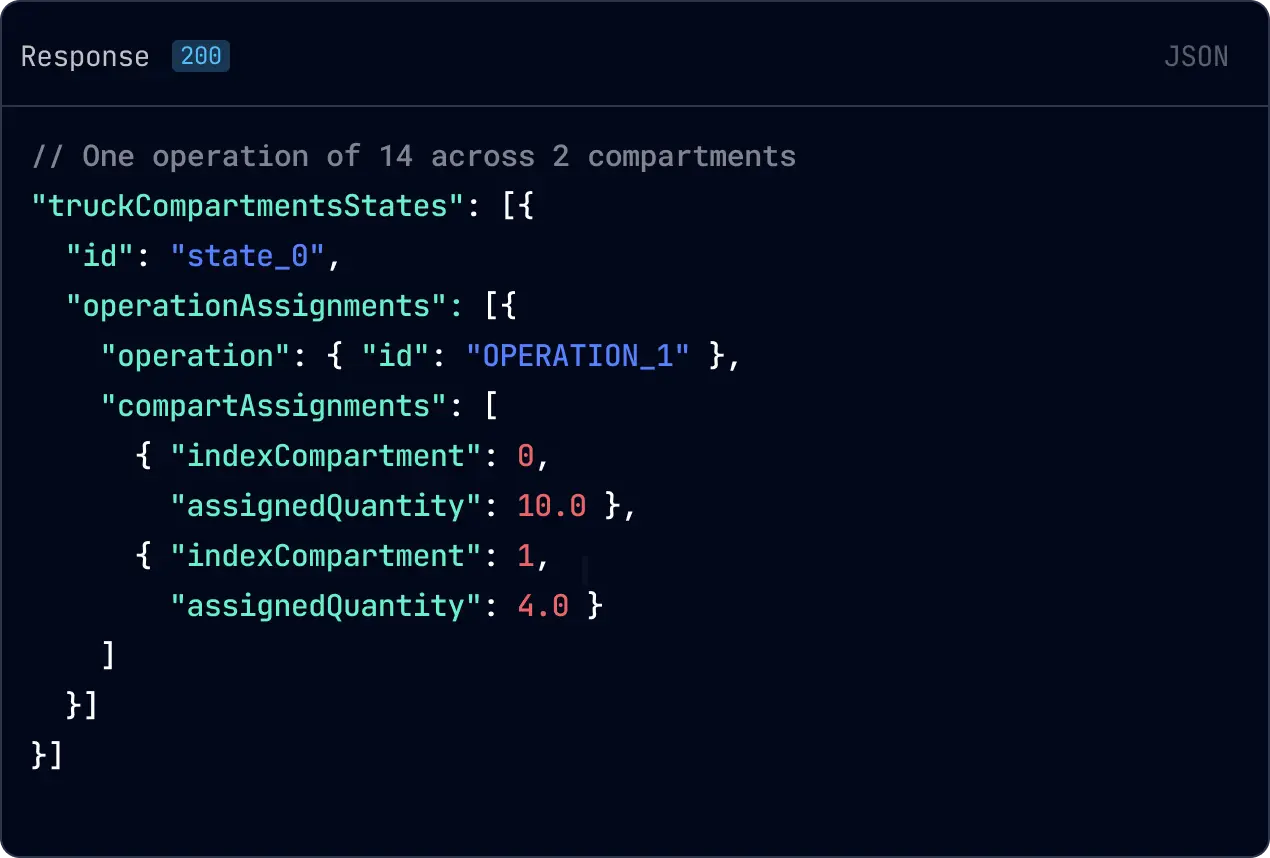
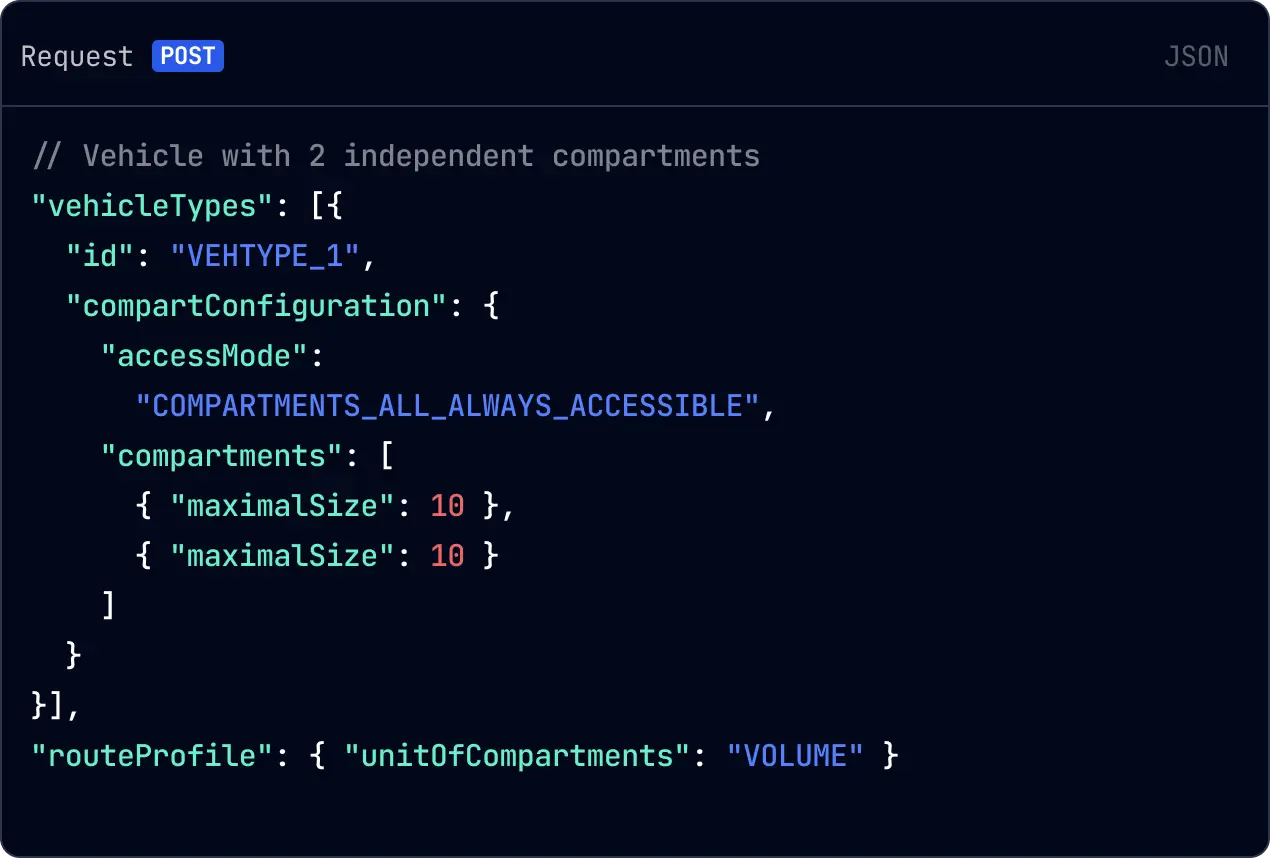
The two compartments are independent: each one is filled and emptied separately, whatever the order of the stops.
The filling rule of the first compartment allows several operations, provided they involve the same product.
The operation of 14 exceeds the capacity of one compartment: the API splits it across compartments 0 and 1 and states the quantity placed in each.
Good to know
A few rules to know before integrating.
| Rule | What you need to know | Parameters involved |
|---|---|---|
| One unit per calculation | All operations state their quantity in the chosen unit: volume, weight or first additional quantity. | unitOfCompartments |
| Rear access depends on the order of the stops | With movable bulkheads, the loading options depend on the sequence of stops on the route. | FROM_THE_REAR_OF_THE_VEHICLE |
| Consecutive routes require a wider scope | The rule only applies if the scope goes beyond the route: availability period or vehicle. | numberOfConsecutiveRoutes scope |
In your customers’ industries
The same rules, six different industries.

Milk collection
Organic and conventional never in the same compartment.

Flour milling
One flour per compartment, shared or not depending on on-board weighing.

Fuel
One heating oil compartment for several customers of the same product.

Animal feed
One formula per compartment, delivered to the right silo.

Multi-temperature
Movable bulkheads, rear access, dual or triple temperature.

Live animals
2 or 3 decks depending on the animals being transported.
FAQ
Your questions about compartmentalised vehicles.
Is compartmentalisation mandatory?
No. If your customers’ vehicles have no compartments, there is no need to describe them: the calculation then relies on the vehicle’s capacities.
Can an order occupy several compartments?
Yes. When an operation exceeds the capacity of a compartment, the API can split it across several compartments. The response states the quantity placed in each.
How do I model a trailer with movable bulkheads?
Give each compartment a minimum and maximum size, cap the whole with a total capacity and choose rear access. The response states the calculated size of each compartment.
How do I know which configuration was selected?
The list of compartment sizes returned for each state identifies which of the configurations declared by your software was used.
Take the next step
Test compartmentalisation on your customers’ vehicles.
Our experts help you translate your customers’ compartments, products and loading rules into API parameters.

