

Fleet, trailers and site access
Describe which vehicles can serve which sites, where trailers can be uncoupled and how many vehicles a bay can handle at the same time. API Optim builds routes that respect these access constraints, and flags the operations that no vehicle can carry out.
What the API handles
Who can go where, with which combination.
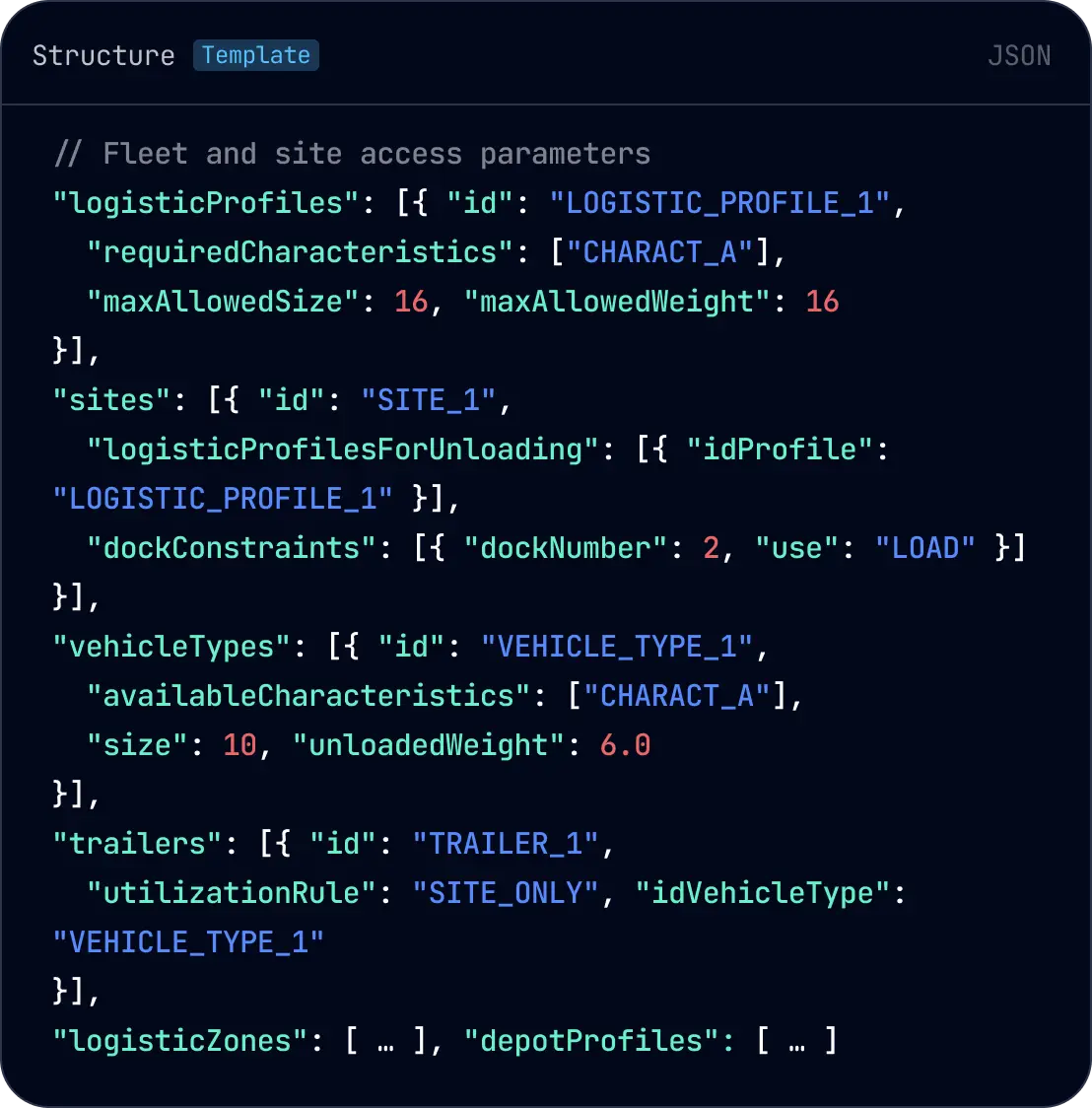
Access conditions are declared in logistics profiles attached to sites, separately for loading and delivery. Vehicles declare their equipment, size and unladen weight in their type. The extract opposite shows where each parameter goes; each card below links to its page in the technical documentation.
01 Site access

Required equipment and qualifications
A site requires characteristics and a vehicle declares the ones it has: tail lift, auger, blower or a specific driver qualification. The vehicle must have all of them to serve the site.
requiredCharacteristics availableCharacteristics

Maximum vehicle size
The site sets a maximum size and the vehicle type declares its own. The unit is up to you: tonnage, gauge, length or number of axles.
maxAllowedSize size

Maximum laden weight
Laden weight is the vehicle’s unladen weight plus the weight of its contents. It changes with every loading, collection, delivery or unloading on the route.
maxAllowedWeight unloadedWeight

Operating zones
Link a set of sites to a set of vehicles, for example a mountain sector or a zone dedicated to a contractor. Sites and vehicles can belong to several zones.
logisticZones acceptedTrucks
02 Depots, departure and bays

Accessible depots
Attach each availability period of a vehicle to a depot profile: depots A and B on Monday, depot C on other days.
depotProfiles accessibleDepots idDepotProfile

Departure and return site
For an in-house fleet, have the vehicle start from and return to its yard, or to two different sites. Either one can be set on its own.
departureSite arrivalSite

Number of docks per site
Limit the number of vehicles loading or unloading at the same time on a site, with one limit for loading and another for unloading.
dockConstraints dockNumber use
03 Trailers

Access to trailer contents
Specify whether the trailer is loaded and unloaded to the site only, to the rigid truck only, or to both, which is the default setting. With site-only access, the full combination must be able to access the site.
utilizationRule SITE_ONLY TRUCK_ONLY SITE_AND_TRUCK
Serving with the full combination
The full combination can access the site if the trailer has the required equipment and the whole unit respects the maximum size and weight. A calculation setting, defined with our experts, can also prevent serving with the full combination: the trailer is then uncoupled beforehand.
trailers idVehicleType

Coupling and uncoupling sites
By default, the trailer can be uncoupled at a depot or at a collection or delivery site on the route. A calculation setting can restrict this to depots only.
isDepot

Partial operations
On a site with restricted access, the rigid truck uncouples its trailer nearby and carries out the operation in several runs, transferring to the trailer between two visits.
partialOperationsDetails TRANSFER
04 Mixed fleet

Journey profiles per vehicle
Use several journey profiles in the same calculation, for example a slow profile for heavy goods vehicles and a fast profile for light vehicles. Each vehicle type is attached to its own profile.
tripProfiles speedPreferences tripProfileName
Annotated example
A vehicle too large for the delivery site.
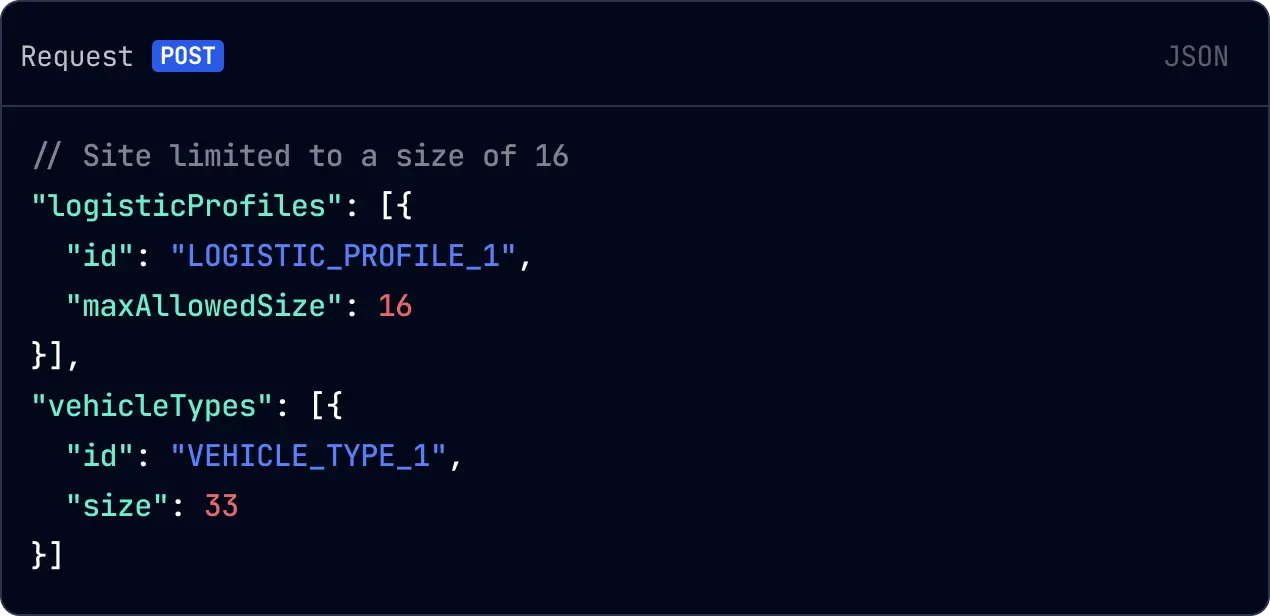
The logistics profile sets the maximum size of the delivery site to 16. It is attached to the site for delivery.
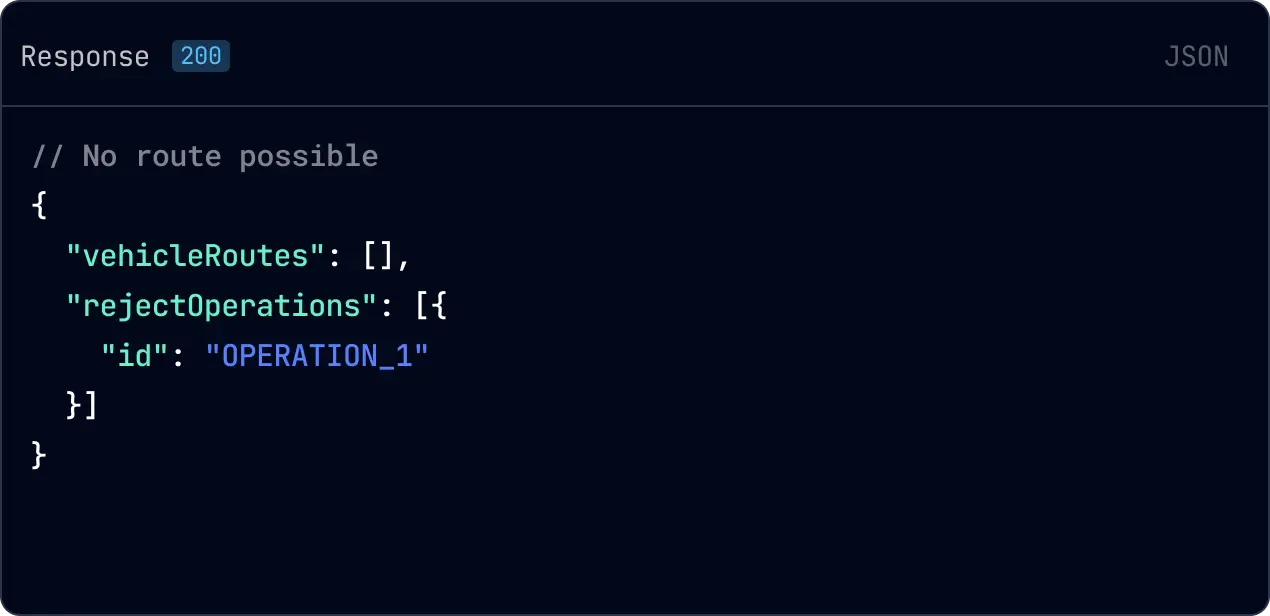
The vehicle type declares a size of 33, above the site’s limit.
The vehicle is not allowed to access the site: the operation is not scheduled and appears in the list of rejected operations.
What the API returns
A collection too large for the rigid truck alone.
Example from the documentation: a rigid truck with a capacity of 1,000 units, a trailer, and two collections on the same site of 1,200 and 800 units. Your software receives the details of each visit, with each operation’s share.
| Step | Activity | Volume | What happens |
|---|---|---|---|
| 1 | COLLECTION | 1,000 | The rigid truck collects 1,000 of the 1,200 units of operation 1, its maximum capacity. |
| 2 | TRANSFER | 1,000 | It transfers these 1,000 units to the trailer and frees up its capacity. |
| 3 | COLLECTION | 1,000 | It collects the remaining 200 units of operation 1 and the 800 units of operation 2. |
The partialOperationsDetails field states, for each visit, the quantity handled for an operation carried out in several runs.
Good to know
A few rules to know before integrating.
| Rule | What you need to know | Parameters involved |
|---|---|---|
| Access constraints add up | Equipment, size and weight can be combined. Access is only allowed if the vehicle meets every constraint. | requiredCharacteristics maxAllowedSize maxAllowedWeight |
| Loading and delivery are set separately | The same site can impose different access conditions depending on whether the vehicle comes to load or to deliver. | logisticProfilesForLoading logisticProfilesForUnloading |
| An inaccessible operation is rejected | If no vehicle can access the site, the operation is not scheduled and appears in the list of rejected operations. | rejectOperations |
| Zoning applies to customer sites | By default, only customer sites are covered by zones. Depots can be added if needed. | logisticZones |
| A dock is only occupied during an activity | Without a service time, an activity does not block a dock. The dock limit therefore requires non-zero service times. | dockConstraints fixedTimeSite |
| Docks are calculated on the full plan | The dock limit is taken into account when the API knows the whole transport plan. It is not intended for actions that only cover part of the routes. | dockConstraints |
| Without a departure site, the route starts at the first loading | By default, the vehicle starts at the first loading or collection site and ends at the last delivery site. This suits contractors. | departureSite arrivalSite |
FAQ
Your questions about fleet, trailers and site access.
Can a lorry deliver to a site with its trailer coupled?
Yes, if the full combination meets the site’s required equipment, maximum size and maximum weight. You can also prevent serving with the full combination: the trailer is then uncoupled before arriving on site.
Can certain vehicles be dedicated to a sector?
Yes. A zone links a set of sites to a set of vehicles. Vehicles assigned to a zone handle the routes in that zone.
Can the number of lorries at a bay at the same time be limited?
Yes, per site, with one limit for loading and another for unloading. This limit applies when the API calculates the full transport plan.
What happens if no vehicle can access a site?
The operation is not scheduled. It appears in the list of rejected operations returned by the API, and your software can show it to the planner.
Does the API take heavy goods vehicle traffic restrictions into account?
Each vehicle type can have its own journey profile, with speeds per road category. Traffic rules are described in the itinerary calculation documentation.
Take the next step
Test site access on your customers’ routes.
Our experts help you translate your customers’ fleet, trailers and access constraints into API parameters.

