

Schedules, service times and regulations
Describe when each site can be served, how long each operation takes and which rules apply to drivers. API Optim builds routes that respect these schedules and places waiting times, breaks and rest periods in the same calculation.
What the API handles
Schedules, service times and driving rules.
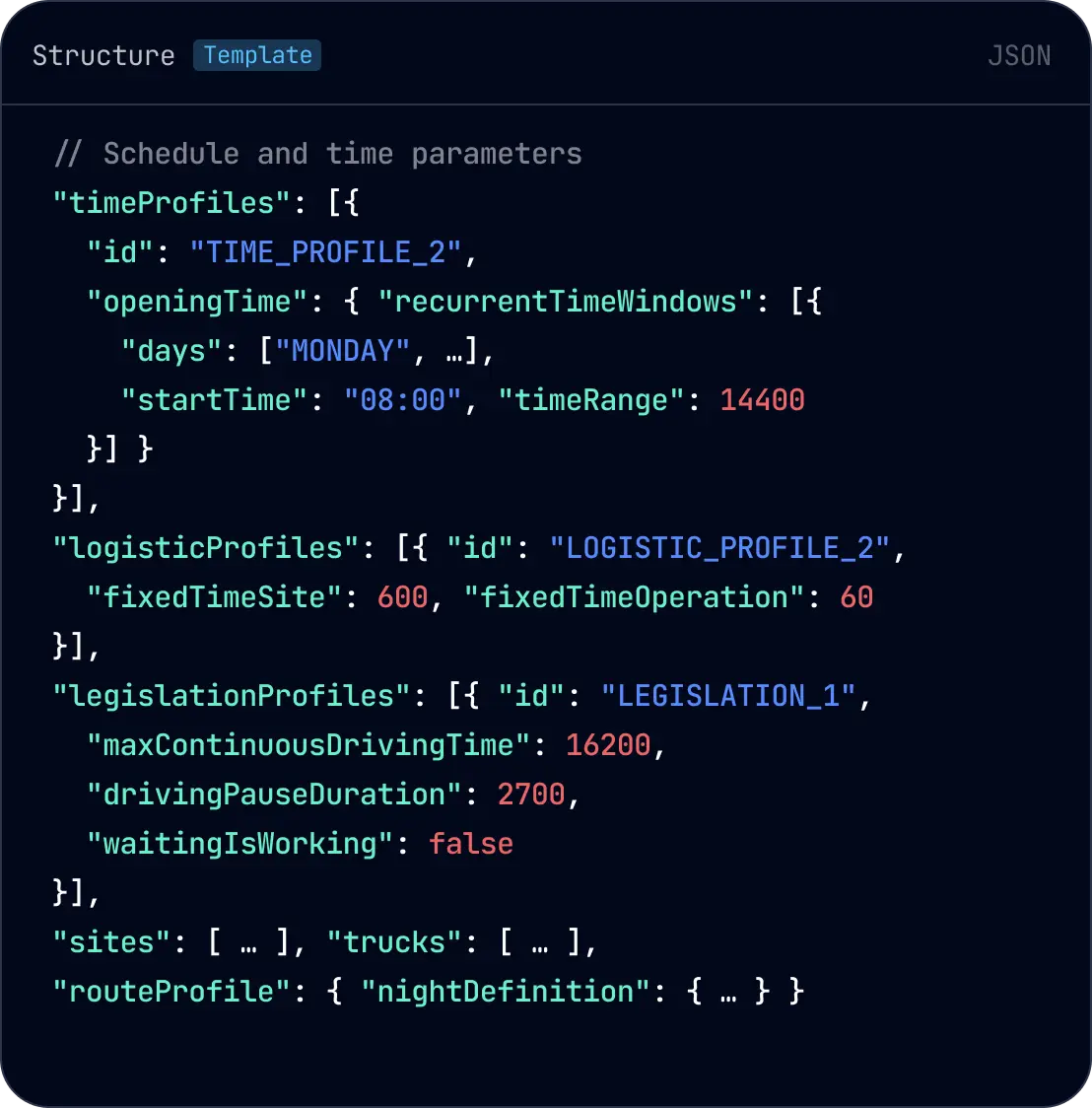
Schedules are declared on sites and operations, service times in logistics profiles, and driver rules in legislation profiles attached to vehicles. The extract opposite shows where each parameter goes; each card below links to its page in the technical documentation.
01 Site and operation schedules

Operation time windows
Give each operation an earliest and a latest date, for loading as well as delivery.
earliestLatestDatesOnOrigin earliestLatestDatesOnDestination

Site opening hours
Define time profiles with fixed dates or recurring by day of the week, and link them to a site, separately for loading and unloading, or directly to an operation.
timeProfiles recurrentTimeWindows timesProfilesForLoading timesProfilesForUnloading

Exceptional closures
Close a site for a given period, an afternoon or a few hours, without changing its usual time profile.
timeProfileExceptions CLOSED timesProfilesExceptions

Schedules by type of goods
The same site can accept one product family at certain times and another at other times. The profile applied depends on the family of the product carried.
timesProfilesForUnloading idProductFamily

Schedules by visit
When an operation is delivered or collected in several runs within the same transport plan, each visit can have its own schedule, using a calculation setting defined with our experts.
timeOtherPassages nbPassages
02 Service times

Fixed times
A fixed time per site visit, a fixed time per operation handled, or both: for example 10 minutes per stop and 1 minute per order.
logisticProfiles fixedTimeSite fixedTimeOperation

Quantity-based times
Calculate loading or unloading time from a flow rate. The handling unit is up to you: pallets, volume, weight, bags.
flow logisticProfilesForLoading logisticProfilesForUnloading

Vehicle-based flow rate
The flow rate can also depend on the vehicle: on the product family unloaded or on the handling equipment it has.
unloadingFlows idProductFamily idCharacteristic
03 Driver regulations

Waiting time
Cap waiting time between two operations and choose whether it counts as working time.
maxWaitingTime waitingIsWorking
Working and driving time
Limit working time and driving time over each availability period of a vehicle.
availablePeriods maxWorkingTime maxDrivingTime

Breaks and rest
Trigger a break after a period of continuous driving or working, which can be split, and a rest after a cumulative time. Counters can reset to zero for each route, for example when the driver changes.
legislationProfiles maxContinuousDrivingTime drivingPauseDurationCuts workingRestDuration pauseManagementByRoute

Night work
Define the night period and a shorter maximum working time as soon as part of the work takes place at night.
nightDefinition maxWorkingTimeAtNightBeforeRest

Additional stops
Add stops to the route: within a time slot, such as a lunch break between 12:00 and 14:00, after a period of working or driving, or at the start or end of each route.
stops timeConditions workConditions positionConditions

Imposed time on an existing route
Set the time of an operation or the departure date of a route that is already scheduled. If the route no longer meets all the constraints, the response flags them.
additionnalTemporalConstraints
What the API returns
A time for every activity on the route.
The solution describes each route as a sequence of time-stamped activities. Your software knows when the vehicle arrives, how long it stays on site and where waiting times, breaks and rest periods are placed.
| Field | Content |
|---|---|
activity | The type of each activity on the route, including departure, loading, journey, delivery, collection, unloading, waiting, break, rest, stop and end. |
timeWindow | The start and end time of each activity, to the second or the minute depending on the chosen precision. |
notWorked | Indicates that a wait, break, rest or stop is not counted as working time. |
nominalDuration | For each journey, its duration and the distance travelled. |
violationConstraints | For an action on existing routes, the list of constraints not met, with a code and a message. |
Annotated example
A 45-minute break after 4 h 30 of driving.
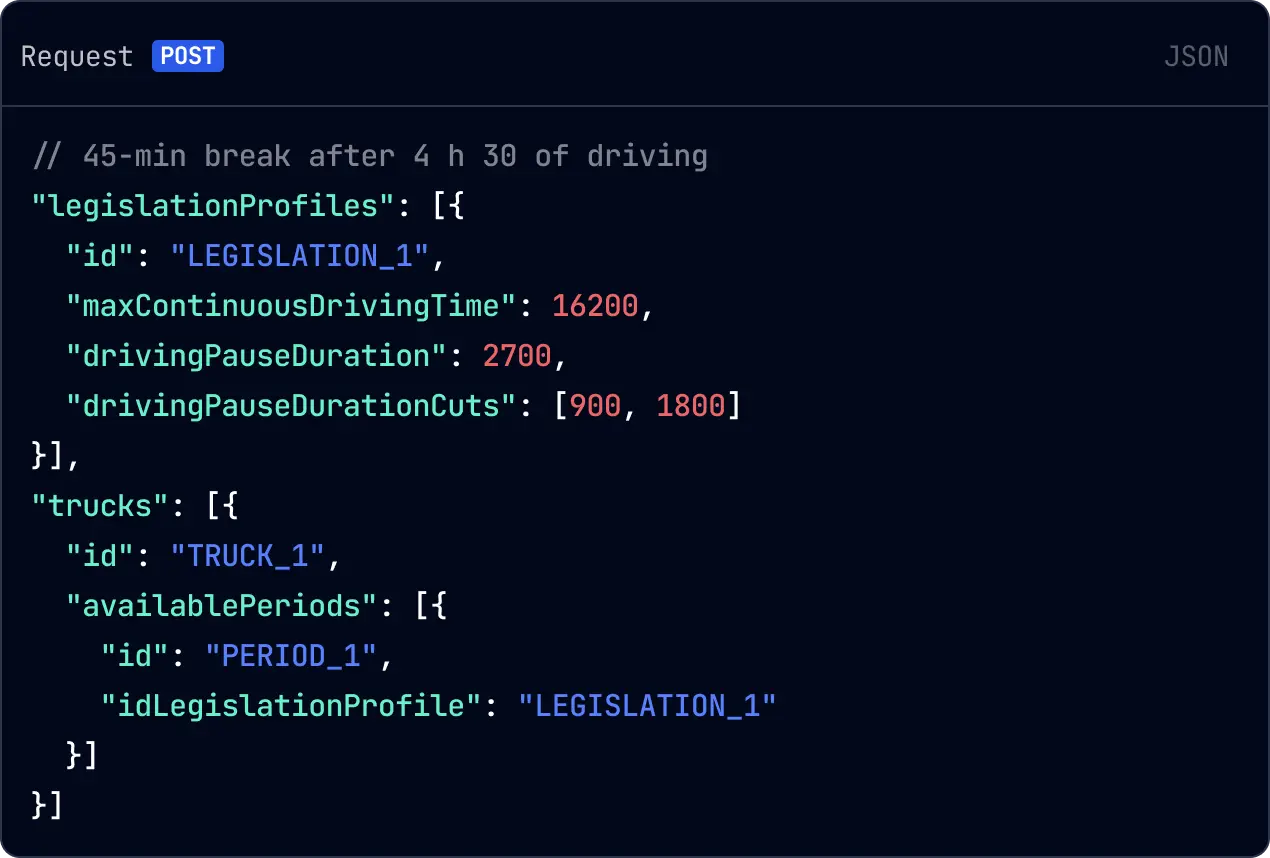
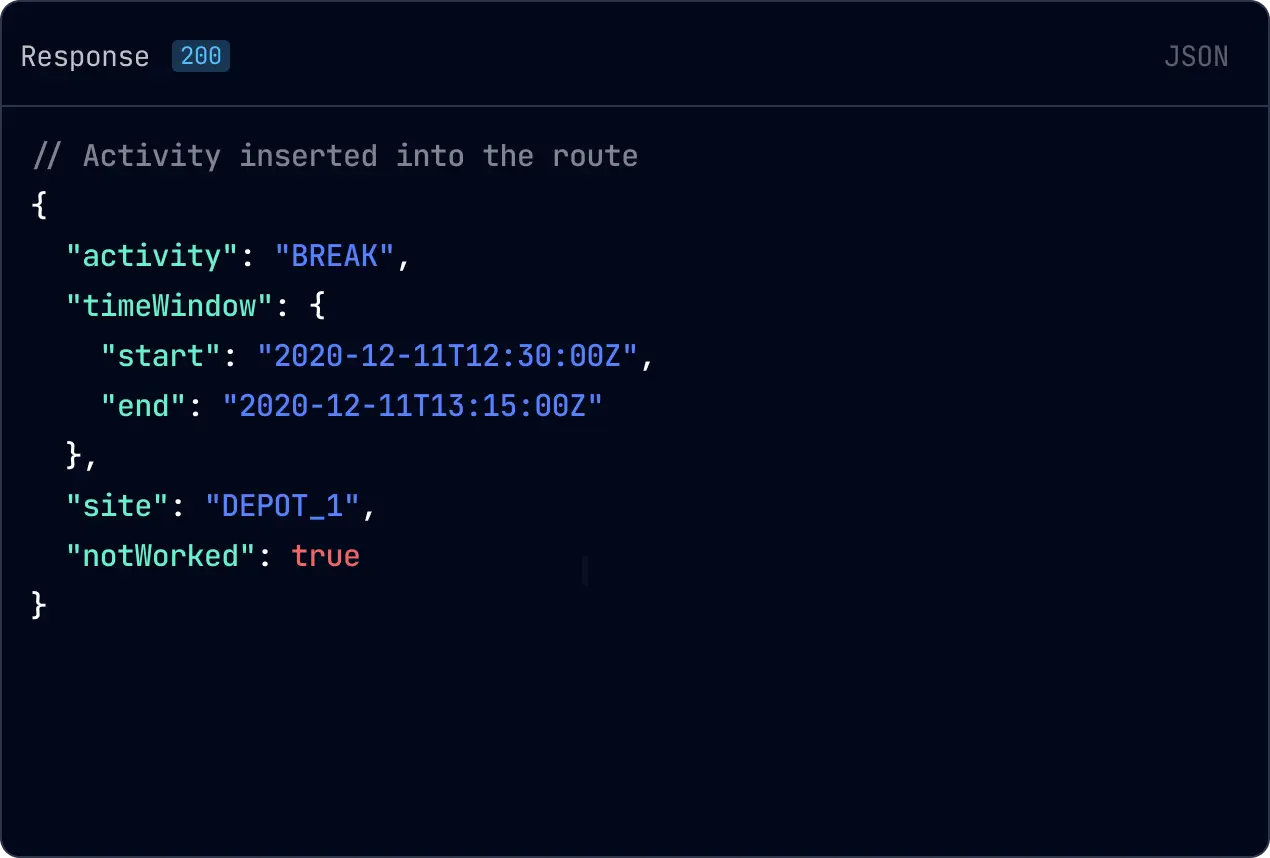
Durations are in seconds: 16,200 s corresponds to 4 h 30 of continuous driving, 2,700 s to a 45-minute break.
The break can be taken in two parts, 15 minutes then 30 minutes. The profile is attached to the vehicle’s availability period.
Once the threshold is reached, the API inserts a 45-minute PAUSE activity into the route. It is not counted as working time.
Good to know
A few rules to know before integrating.
| Rule | What you need to know | Parameters involved |
|---|---|---|
| The operation’s profile takes precedence over the site’s | With no time profile on either the operation or the site, the site is considered open 24/7. | idTimeProfileOnDestination timesProfilesForUnloading |
| Time windows and opening hours intersect | The selected time must respect both the operation’s earliest and latest dates and the time profile. If they do not overlap, the operation cannot be scheduled. | earliestLatestDatesOnDestination timeProfiles |
| Waiting counts as work by default | If the parameter is not set in the legislation profile, waiting times are counted as working time. | waitingIsWorking |
| The flow rate per characteristic takes priority | If both a flow rate per characteristic and a flow rate per product family are defined, only the first is taken into account. | unloadingFlows idCharacteristic |
| Durations are declared in seconds | Flow rates are expressed in handling units per second. Calculation precision can be set to the second or the minute. | timePrecision flow |
In your customers’ industries
The same rules, six different industries.

Milk collection
Farm opening hours, collection time windows and drivers’ night work.

Flour milling
Receiving time windows often early in the morning, blowing times based on tonnage.

Fuel
Service stations that receive deliveries in specific time windows.

Animal feed
Different delivery time windows depending on the product.

Multi-temperature
Receiving hours at shops and restaurants.

Live animals
Access hours by species, drivers’ driving times and breaks.
FAQ
Your questions about schedules and regulations.
Can a site have different hours for loading and delivery?
Yes. A site can have one time profile for loading or collection and another for unloading or delivery.
How do I handle an exceptional site closure?
Declare a closure exception for the period concerned and link it to the site. The usual time profile stays unchanged.
Are breaks placed automatically?
Yes, by default. As soon as a driving or working threshold is reached, the API inserts a break or rest into the route. These activities are not counted as working time.
Can counters be reset between two routes?
Yes. Driving and working times can reset to zero at the end of each route, which lets you model, for example, a change of driver on the same vehicle.
Does the API check the regulations that apply to my customers’ business?
The API applies the thresholds declared by your software: driving time, breaks, rest, night work. Choosing the values that match the applicable regulations remains your customers’ responsibility.
Take the next step
Test schedules on your customers’ routes.
Our experts help you translate your customers’ time windows, service times and driving rules into API parameters.

